Showing posts with label Tips and Tricks. Show all posts
Showing posts with label Tips and Tricks. Show all posts


50+ Best WordPress Themes – Time To Enhance Your Website?
BUILDER – Responsive Multi-Purpose Theme – MORE INFO

Powerful WP Theme designed in a clean and minimalistic style. This theme is very flexible, easy for customizing and well documented, approaches for personal and professional use. BUILDER has been coded in HTML5 & CSS3 and jQuery. It has a solid flexible responsive layout that scales from 320px to 1260px width all Bootstrap features. Follow me to be notified for future updates!
One Touch – Multifunctional Metro Stylish Theme – MORE INFO

One Touch is a fast, easy, light template will decorate almost any site on WordPress. It is loaded with features. Many Shortcodes, Page Templates and Theme Options give you full control over your website. Styles are included in a template for WooCommerce so you will be able to create without problems the catalog with shop on your site.
Avada Responsive Multi-Purpose Theme – DEMO

The Avada theme is clean, very flexible and has a fully responsive design. It is packed with options, and has powerful customization options plus lots of awesome features, amazing layer slider, awesome flex slider plugin, unlimited colors, unlimited sidebars, custom post types, 500+google fonts, 11 custom widgets, tons of short codes, 4 post types, multiple portfolio and blog layout options, ratings system, SEO optimized, and is translation ready. The clean, modern design can be used for any type of website; business, corporate, portfolio, products, etc. It also comes with free support.
Origin Responsive WordPress Theme – DEMO

Origin is a stunning grid-based theme that tells a story through imagery. The theme creates a truly engaging experience by saturating the screen with your beautiful photos. The theme is also responsive, meaning it will look and work great on mobile devices as well. If you are an artist looking to showcase your latest work, or if you are a blogger looking to give your visitors a fun new way to browse your latest posts, then Origin is great choice for you!
MetroStyle – Responsive WordPress Theme – DEMO

This theme can be applied to any business needs and give your website a fresh new look. The theme has lots of customization features. Easy color and image selection with many design settings can help you transform MetroStyle into a unique business selling tool. The MetroStyle theme is SEO optimized and uses only CSS for fast loading.
SIMPLEPRESS Business WordPress Theme – MORE INFO

SimplePress is a simple and clean page-based corporate WordPress theme. It is great for anyone looking to give their website professional look and feel. The theme features a business style homepage with a beautiful well integrated JavaScript slider and clear hierarchy, as well as fully functional Blog and Gallery sections. Elegant themes has a affordable theme pack offering 77 premium WordPress themes for only $39.
TruePixel WordPress Theme – MORE INFO

TruePixel is a fully responsive WordPress Theme from MyThemeShop. This Widget ready, clean WordPress theme is a perfect mix of elegance and style. You get an eye catchy layout without compromising on the space for your content. TruePixel is highly customized for speed and usability, comes with tons of options and unlimited color schemes.
10 Best Professional Free Blogger Template Of 2013(Seo Friendly Theme)
1. Salahuddin Ayubi Blogger Template.

Demo | Download
2. Sensational Blogger Template

Demo | Download
3. MaxMag Responsive Blogger Template

Demo | Download
4. Blogism Elegant Blogger Template

Demo | Download
5. CopyBlogger V2 Premium Blogger Template

Demo | Download
6. Pinfinity (Pinterest Like) Blogger Template

Demo | Download
7. Eleven40 Blogger Template

Demo | Download
8. Artarius Blogger Template

Demo | Download
9. Wallbase Blogger Template

Demo | Download
10. Sporty Magazine 2 Blogger Template

Demo | Download
Top 10 Fast Loading Free Blogger Templates of year 2012
List of Top 10 Fast Loading Free Blogger Templates of Year 2012
#1. THESIS BLOGGER TEMPLATE

#2. MBT CHURCH THEME

#3 – LABORATORY BLOGGER TEMPLATE

#4 – MASH 2 BLOGGER TEMPLATE

#5 – CURSIVE BLOGGER TEMPLATE

#6 – PANADA BLOGGER TEMPLATE BY LORD HTML

#7 – FLAMINGO BLOGGER TEMPLATE BY LORD HTML

#8 -MAYUMI BLOGGER TEMPLATE

#9 – PLATINUM THEME BLOGGER TEMPLATE

#10 – FLASH NEWS THEME

So my list of Top 10 Fast Loading Free Blogger Templates of year 2012 is finished now. Try them and show your response by commenting below.
Blogger Template Designer
Blogger Template Designer is a new way for you to easily customize the look of your blog. You can select a variety of templates, images, colors, and column layouts to make your blog an expression of you. To get to the Template Designer, just click on the drop-down menu of the gray Post List icon, and selectTemplate. From there, you'll be able to choose and customize your template.
As you play around with the Template Designer, you’ll see a preview of how the blog will appear based on the choices you’ve made, which you can expand to by pressing the toggle to Expand Preview between the Blogger Template Designer dashboard and the preview. When you’re satisfied with the look of your blog, you can make them go live by pressing Apply to Blog in the top right hand corner of the Template Designer.
To get started with Blogger Template Designer, select a template for your blog from one of the professionally designed templates that are available. Each template appears as a large thumbnail that when clicked will show different variations on the template below that you can select by clicking on them. Note that clicking a new template will erase any customizations you’ve made on a previous template.
Once you’ve chosen a template, you can continue customizing the look of your blog.
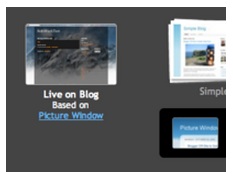
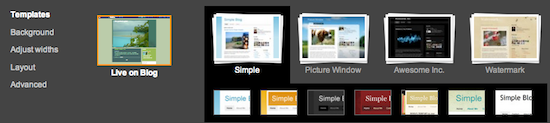 No matter what template you are previewing in Template Designer, you can always see what is currently live on your blog by looking at the Live on Blog thumbnail in the Template Designer control panel. You can also click on it to reset the template in the Template Designer to the live version of your blog.
One of the best new features of Template Designer is the ability to change the color of your background image. This is possible when a background image has transparency. You can tell that a background image is transparent because it has a checkerboard in the top right hand corner of the image.
Once you’ve selected your image, you can change the color of the background by clicking on Main Color Theme and then selecting the color of your choice.
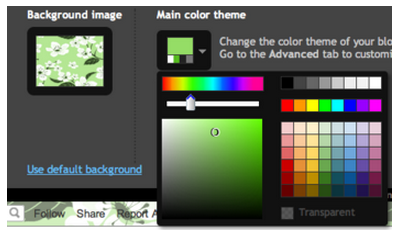 You can only change the color of your background if the background is transparent. Also, if the template that you chose has a grey background, you cannot change its color.
In addition to selecting and personalizing your blog’s background image, you can also choose a color theme to apply to aspects of your blog, including text and links. You can do this by playing with the Main Color Theme or by choosing one of our Suggested Themes. Changing the color theme of your blog will change the colors for all aspects of the blog template that can be changed.
Note: If background image is not transparent, themes will alter the text color scheme of the blog
Note: For information on uploading your own custom background image, please see our article on Adding custom CSS to your blog.
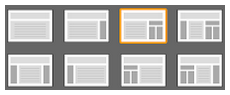 If you want to add or remove gadgets or edit gadget settings, you cannot do this through Blogger Template Designer. Rather, you have to do this on the general Layout tab.
To get started with Blogger Template Designer, select a template for your blog from one of the professionally designed templates that are available. Each template appears as a large thumbnail that when clicked will show different variations on the template below that you can select by clicking on them. Note that clicking a new template will erase any customizations you’ve made on a previous template.
Once you’ve chosen a template, you can continue customizing the look of your blog.
Background
Even though you’ve chosen a template, you can still change the way that it looks. Using Blogger Template Designer, you can choose the background color or image for your blog and then play with the color scheme. To start customizing your background, click on the thumbnail under Background Image.One of the best new features of Template Designer is the ability to change the color of your background image. This is possible when a background image has transparency. You can tell that a background image is transparent because it has a checkerboard in the top right hand corner of the image.
Once you’ve selected your image, you can change the color of the background by clicking on Main Color Theme and then selecting the color of your choice.
In addition to selecting and personalizing your blog’s background image, you can also choose a color theme to apply to aspects of your blog, including text and links. You can do this by playing with the Main Color Theme or by choosing one of our Suggested Themes. Changing the color theme of your blog will change the colors for all aspects of the blog template that can be changed.
Note: If background image is not transparent, themes will alter the text color scheme of the blog
Note: For information on uploading your own custom background image, please see our article on Adding custom CSS to your blog.

